Copyright © 2004-2026 by GoalEnforcer, SVT Systems. All rights reserved.
GoalEnforcer Release News


February 19, 2007 - NEW GoalEnforcer 1.7.1 released
- Clickable Subtask Level Display: clicking on the subtask level indicator will now take you to the desired level.
- Export: new "Export" option has been added to the "Save/Save As" button.
- "Export Project Data" has the same functionality as the "Save Report" on the Status Report Window. It allows you to export the data in Text, CSV (for Excel) or XML formats.
- The "Export Current View" option adds new functionality: it allows you to export the current graphical view (map snapshot) into a PNG image file. You can then import it into Word, PowerPoint or your favorite word processing application. You can also post it on websites or attach it to emails.
- A new Hotkey (keyboard shortcut) has been added for the Export feature: Ctrl+Shift+X
- The FTP engine has been improved.
- You can now change the name of your remote report file (it used to be fixed as "report.html"). By default it is set to the main goal name.
- Notes can now be printed with your status report. If you click the "Print" button with "Show Notes" check marked, the printout should include the notes.
- Notes in HTML are now formatted the same way they are formatted in the Status Report Window (line breaks are included).
- The spoke numbering refresh issue has been fixed.
- "Loose Goals" (non connected) are now excluded from the progress calculation.
December 17, 2006 - GoalEnforcer 1.7 released
New Features:
- Add Hyperlinks: you can now add Hyperlink Objects for fast access to websites, computer files and email addresses!
- Support for Email Authentication.
- Improved look 'n' feel for the Windows Classic mode.
- Auto DPI detection for higher resolution monitors.
October 19, 2006 - GoalEnforcer 1.6.5 released
New Features:
- Milestone plot is now updated for partial progress (you don't need to complete a top level goal in order to have the line updated)
- Expanded support for international date formats
- Added command line support (e.g. you can invoke <goalenfercer.exe myproject.gef> at the command line prompt). This is useful if you want to call GoalEnforcer from other applications
- Added hotkey for "Edit Properties" (Ctrl+E)
August 7, 2006 - GoalEnforcer 1.6.1 released
New Features:
- GoalEnforcer now has Hotkeys (keyboard shortcuts). In order to view the Hotkey Table: click on the "Help" button (question mark) and then "Hotkeys".
- Faster loading of large projects.
May 29, 2006 - GoalEnforcer version 1.6 released
New Features:
- Clone Button: you can now duplicate goals and tasks by selecting them and clicking the Clone Button.
- Notes Icon: indicates that the item has notes.
- Notes can now be displayed on the Status Report by clicking the "Show Notes" box.
- Progress Bar starts displaying progress (changes color) as soon as you have 1% done.
- Fixed issue with the HTML button and the FireFox browser.
- You can now print the Main Screen (main graphical area showing your goal maps).
- When entering the Goal/Task name, clicking outside the balloon will now accept the text.
February 10, 2006 - GoalEnforcer version 1.5 released
New Features:
- Subtask level indicator located on the left top corner for easier navigation and abstraction.
- Notes Field.
- ClipPad now works across projects.
November 16, 2005 - GoalEnforcer version 1.4
New Features:
- Email Status Report directly from application.
- FTP Status Report.
September 9, 2005 - GoalEnforcer version 1.3
New Features:
- Generate Status Report in HTML format.
- Export Status Report in XML, TXT and CSV (comma separated values, good for exporting to spreadsheets)
July 7, 2005 - GoalEnforcer version 1.2
New Features:
- Improved Status Report Graphics.
- Added Milestone Progress Graph.
April 11, 2005 - GoalEnforcer version 1.1
New Features:
- Added Status Report Window.
- Automatic check of Status after midnight.
December 16, 2004 - GoalEnforcer version 1.0
GoalEnforcer Initial Release.
April 1st, 2007 - NEW VERSION - GoalEnforcer Hyperfocus 2007 r1 released!
- New Hyperfocus Zone: a separate space you can use to focus on tasks/goals you are currently working on, or the ones that should be done as soon as possible.
- Focused Status Report: 2 modes, it can show the Hyperfocus Zone items or the current map view.
- Calendar View: check the important dates. You can selectively display Due Dates, Start Dates and actual Finish Dates.
- Import Project Data: for information sharing. Import data using easy spreadsheet format.
- Recurrent Cloning: for easier implementation of recurrent tasks.
April 17th, 2007 - NEW VERSION - GoalEnforcer Hyperfocus 2007 r2 released!
- New G-Map: a new map that displays the overall view of your goal plan.
- Brainstorm Quick Entry Mode: enter your goals faster by typing in a sequence, one after the other.
June 14th, 2018 - NEW 2018 VERSION - GoalEnforcer Hyperfocus MacOS 2018r0 released!
May 29th, 2018 - NEW 2018 VERSION - GoalEnforcer Hyperfocus Windows 2018r0 released!
NEW EXCITING VISUAL REPORTS:
- Click the G-map button on the lower left corner and enjoy the four new visual report modes: Org Tree, Bubble Map, Pie Map and Radial Tree. Check new GoalEnforcer visual report details.
April 19th, 2018 - NEW IOS BETA VERSION RELEASED (iPhone, iPad)
GoalEnforcer for Apple iOS now available as Beta, from Apple's TestFlight. Please contact tech support if you haven't received download directions yet. See the GoalEnforcer for iOS Guide to learn how it works.
February 28th, 2018 - NEW ANDROID VERSION RELEASED
GoalEnforcer for Android now available for registered users. Please contact tech support if you haven't received download directions yet. See the GoalEnforcer for Android Guide to learn how it works.
November 19th, 2015 - 2015 VERSION - GoalEnforcer Hyperfocus Mac OS X 2015r0 released!
November 12th, 2015 - 2015 VERSION - GoalEnforcer Hyperfocus Windows 2015r0 released!
- NEW GOAL EXPORT/IMPORT function:
- You can now export your goal (and sub-goals) into a new separate project.
- You can also import another project into your project (merge).
- These two new functions give you total freedom for merging and splitting projects!
- To access these new features, click the "Actions" button on the bottom toolbar and then select either "Goal Export" or "Goal Import."
- PowerPoint Export: click the "Software Integration" button then select "Export to PowerPoint."
- Freemind v1.1 support.
- You can now export your Notes to MS Word: open the "Options" window, select the "Word" tab and checkmark the "Show Notes" box.
- UTF-8 MS Word Report support (to display international fonts).
- Improved GoalEnforcer Cloud Encryption.
October 21st, 2014 - 2014 VERSION - GoalEnforcer Hyperfocus Mac OS X 2014 r0 released!
- GoalEnforcer for Mac 2014 adds compatibility with the new OS X 10.10
- New GoalEnforcer Cloud (see below)
September 14th, 2014 - 2014 VERSION - GoalEnforcer Hyperfocus Windows 2014 r0 released!
- Version 2014 introduces the new GoalEnforcer Coud:
• Access your GoalEnforcer projects any time, any place.
• Auto-backup and auto-sync.
• Safe encrypted connection.
• Real time information on your hands, anywhere you go.
• One central project location, multiple access. No more need to carry a USB drive.
Click here for more GoalEnforcer Cloud details.
August 29th, 2013 - 2013 VERSION - GoalEnforcer Hyperfocus Mac OS X 2013 r0 released!
June 5th, 2013 - 2013 VERSION- GoalEnforcer Hyperfocus Windows 2013 r0 released!
- Work Hour data entry field and automatic calculation: you can now enter the work hours for your tasks. (see more details)
• Improve your time management skills by tracking the time spend on your tasks.
• Total time spent is automatically calculated by adding all individual sub-task work hours.
• Export the results to Word reports, Outlook, HTML webpages, emails and Excel (csv) spreadsheets.
- Added MS Word Export options: you can now select the columns to be displayed on your Word report. (Open the Options window and then click the "Word" tab")
- Improved Freemind Export and Import functionality: added support for Freemind v0.9
- Hyperlink objects now support https:// links
Nov 7th, 2012 - 2012 VERSION - GoalEnforcer Hyperfocus Mac OS X 2012 r0 released!
June 14th, 2012 - 2012 VERSION - GoalEnforcer Hyperfocus Windows 2012 r0 released!
- Visual TimeBox Timer: Time Boxing is a very simple and useful time management technique that can quickly help you improve your productivity.
- The new visual Time Boxing timer allows you to set a fixed period of time (time box) to work on a task.
- It includes a countdown timer and a visual time container that gives you feedback on how much time you have left.
- You can access the timer by navigating to the Hyperfocus Zone and clicking the TimeBox Timer button.
- The timer includes some preset values and it also allows you to edit your list of favorite time intervals.
Click here for more TimeBoxing Timer details.
Aug 29th, 2011 - 2011 VERSION - GoalEnforcer Hyperfocus 2011 r0 for Mac OS X released!
July 14th, 2011 - 2011 VERSION - GoalEnforcer Hyperfocus Windows 2011 r0 released!
- Interface Refresh: new gray interface theme (great for businesses).
You now have the option to select between the classic GoalEnforcer
blue interface and the newest gray interface theme.
- Password Protection: keep your project safe and private.
Projects can now be protected by individual password access.
- Enhanced Emailer Support: added support to yahoo.com and other encrypted email services.
- Hyperlink objects now support folders.
- Goal objects can now display longer goal names.
- Enhanced Auto Save and Auto Back Up functionality
- Option to disable save confirmation message.
April 20th, 2011 - New Mac OS X versions - GoalEnforcer Standard and GoalEnforcer Starter Edition for Mac OS X released!
November 17th, 2010 - 2010 VERSION - GoalEnforcer Hyperfocus Mac OS X 2010 r1 released!
October 6th, 2010 - 2010 VERSION - GoalEnforcer Hyperfocus Windows 2010 r1 released!
- New Autosave function will save the open project automatically at specified time intervals.
- Improved Autobackup function will create a backup copy of your project when you start a new editing session.
- Both Autosave and Autobackup should be enabled and configured by accessing the "Options" menu, under the "Open" button on the top toolbar.
- New Project Reopen function allows you to quickly open recent files.
April 9th, 2010 - 2010 VERSION - GoalEnforcer Hyperfocus Mac OS X 2010 r0 released!
April 5th, 2010 - 2010 VERSION - GoalEnforcer Hyperfocus Windows 2010 r0 released!
- Multi-Project Navigator: this is a feature that has been highly requested by our users. If you are running two, three, five, ten, or even hundreds of projects at the same time (yes, some businesses and contractors actually do that) you can now use the GoalEnforcer Multi-Project Navigator to check the status of all your projects in one window (and then decide which one you want to open). It's very easy to use: just click the "Proj Nav" selection under the "Open" button, select the folder where your projects are stored and the system should automatically scan all your projects and show you the status info. You can then double-click on any of the entries and it should open the selected project for you.
- Fixed issue with the saved G-map picture.
November 17th, 2009 - 2009 VERSION - GoalEnforcer Hyperfocus Mac OS X 2009 r1 released!
- Added support for Snow Leopard Mac OS X
October 12th, 2009 - 2009 VERSION - GoalEnforcer Hyperfocus Windows 2009 r1 released!
Among the new features and improvements:
- The most exciting new feature is the Microsoft Word integration. You can now send your Status Report directly to Word by clicking the Software Integration button (double green arrow, bottom toolbar) and then choosing "Export to Word." This will open a new Word document containing your GoalEnforcer Status Report. Once in Word, you can reformat it (add header, change font, add your logo) and use Outlook to share it with your friends, family, co-workers, employees, contractors.
- Print focused report: you can now click the "Focus" button on the Status Report window, select either “Hyperfocus Zone or “Current Map View” and then click the Print button. It will print the same focused report that you see on your screen.
- Option to disable “File Saved” confirmation message by checking the "Don't show this again" box.
- Fixed issue when upper level and lower level view of the same task wouldn’t show same note.
- Increased support for international date formats.
- Fixed printing issue that caused multi-page report printouts to generate errors on some printers.
May 9th, 2009 - 2009 VERSION - GoalEnforcer Hyperfocus Mac OS X 2009 r0 released!
April 21st, 2009 - 2009 VERSION - GoalEnforcer Hyperfocus Windows 2009 r0 released!
New Action Button added:
- Move all tasks to Clipboard Area
- Clear Clipboard Area
- Adjust Multiple Dates
December 1st, 2008 - 2008 VERSION - GoalEnforcer Hyperfocus Mac OS X 2008 r3 released!
November 18th, 2008 - 2008 VERSION - GoalEnforcer Hyperfocus Windows 2008 r3 released!
New features:
A) Added Gantt Chart View Mode:
- Besides the original "Map View" and "Tree View," you now have the newest "Gantt Chart View" (third Mode button from the left).
- The Gantt View shows you a time bar for each goal/task in your project. The bar begins at the "Start Date" and it ends at the "Due Date" (or "Finish Date" if the goal/task has already been completed).
- The Gantt View shows one month at a time. You can move to the next month or previous month by clicking its left and right arrows on the top.
- The last column to the right shows either the "Start Date" or "Due Date." You can select the date you want to see by clicking the "down arrow" on its right.
- You can edit dates (Start Date and Due Date) by selecting the row (clicking on it once) and then clicking on the Start Date/Due Date column.
- The bar color follows the same color code as the main map:
- If a task/goal is due today, it shows up in yellow.
- If a task/goal has less progress than expected, it shows up in yellow too ("Running Behind").
- Completed goals/tasks show up in green.
- Overdue goals/tasks show up in red.
- Tasks/goals you've been working on (making expected or more than expected progress) show up in blue.
- Tasks/goals that you haven't started yet show up in gray.
- Tasks/goals that have subtasks/subgoals show up in dark blue
-Today's date is highlighted in orange on the calendar header.
- You can move back and forth through the views. Whatever goal/task is highlighted in one view is also highlighted in the other view.
B) Bigger Notes Field:
- The "Change Properties" window now has a bigger notes field. The notes field is now bigger and always open (you no longer need to click the "Notes" checkbox to open the Notes Field).
- Clicking the "X" box (cancel) will now detect changes and confirm that you want to dismiss the dialog.
- The "OK" button has been renamed to "Save."
C) Tasks/Goal Names in Map View mode:
-Task/Goals bubbles now display 3 lines for its name label (instead of 2).
D) Fixed Swedish fonts used in link names.
E) Improved G-mail support.
F) Fixed some Hotkey issues.
September 21st, 2008 - 2008 VERSION - GoalEnforcer Hyperfocus 2008 r2 released!
- Added Support for sending Report emails through Gmail SMTP
- Added "Save G-map" feature
- Changed some of the KeyBoard Shortcut Keys:
Ctrl+SpaceBar => Checkmark Complete/Incomplete
Shift+SpaceBar => Add to Hyperfocus Zone
September 1st, 2008 - 2008 VERSION - GoalEnforcer Hyperfocus 2008 r1 released!
- Fixed the problem of some particular cases where goals couldn't be moved across projects
- Fixed the problem where some tasks would turn into links
February 21st, 2008 - 2008 VERSION - GoalEnforcer Hyperfocus 2008 r0 released!
- Main Feature: Interactive Outliner/Tree view: you can now select two views of the project, the default "Map View" and the alternative "Tree View."
- "Tree View" shows your project in outline format, similar to the Status Report structure, but interactive. You can either expand or contract rows containing goals with sub-goals by clicking the disclosure triangle. You can edit all columns: goal/task name, due date, start date, status, finish date and notes. Just click the row you want to edit (in order to select it), and then click again on the field of interest. You can also click and drag the status bar control (located by the % done value).
Main benefits:
- You can navigate back and forth between the map view and tree view. If you select a goal in the map and then click the tree view mode, the outline tree will expand and highlight this selected goal. The reversal is also true, if you select a goal when in tree mode and then move back to the map view mode, the map will be focused on this goal location.
- You can quickly update your status report/dates once your project map has been defined.
November 21st, 2007 - GoalEnforcer Hyperfocus 2007 r5 released!
- Added "Save Remote" and "Open Remote": you can now store your projects on the Internet (using FTP), such that they can be accessed from everywhere you go.
- Added "Make Template" feature: save your project as a template, so that it can be reused for other similar projects.
- Fixed HTML report formating issue: it is now displayed correctly on both Gmail and AOL webmail.
October 1st, 2007 - GoalEnforcer Hyperfocus Mac OS X released!
Download the Mac version now
September 14th, 2007 - GoalEnforcer Hyperfocus 2007 r4 released!
Software Integration has been added, and it now allows you to exchange information with other software tools.
- "Export to Outlook" sends project data to Microsoft Outlook. The first time you import to Outlook, it will create a folder in the task area with the same name as the GoalEnforcer project being exported.
- "Import from Outlook" reads the modifications you did to your tasks while using Outlook, and then updates GoalEnforcer accordingly. It only reads the tasks that are under a folder which has the same name as the GoalEnforcer project. Tasks that have been added while using Outlook will appear on the ClipBoard area, so that you can rearrange them later.
- "Export to Freemind" will extract project data and generate a project map file that can be viewed with Freemind. If you have Freemind installed on your computer, it will automatically open the project map after the conversion has been done.
- "Import from Freemind" will import maps generated by Freemind.
July 30th, 2007 - New GoalEnforcer Hyperfocus "HOW-TO" lessons released
Check the new Hyperfocus HOW-TO page.
July 11th, 2007 - GoalEnforcer Hyperfocus 2007 r3 released!
- Transfer goals across projects: you can now transfer goals containing sub-goals across different projects.
- Brainstorm Quick Entry Mode window can now be closed by clicking the Brainstorm Mode button again when the window is open.
- Multi-page printing of projects containing notes.

![]()

April 14th, 2020 - Release of improved GoalEnforcer Cloud backend system
November 21st, 2019 - GoalEnforcer Web App v2 released to advanced and premium GoalEnforcer Hyperfocus users
July 10th, 2019 - GoalEnforcer Web App released to advanced and premium GoalEnforcer Hyperfocus users
March 19th, 2019 - GoalEnforcer Web App release preview
November 7th, 2018 - EXCITING NEW PRODUCT ANNOUNCEMENT - "THE VISUAL OUTLINER"
The GoalEnforcer team is proud to announce the release of our brand new product: The Visual Outliner, an exciting brainstorming and thought organization software. Check our new website at:
www.visualoutliner.com

March 17th, 2024 - NEW GoalEnforcer WebApp released!
- No need to download: you can now run the GoalEnforcer web app though any web browser, such as
Firefox, Safari, Google Chrome, Microsoft Edge, Opera, Vivaldi, Brave and others.
- Any device: you should be able to run it on desktops, laptops, tablets and phones.
- Any operating system: Windows, macOS, iOS, Android, Linux, Google Chrome.
The GoalEnforcer WebApp is currently available by invitation only!
Request your GoalEnforcer WebApp invitation today
September 27th, 2020 - NEW 2020 VERSION - GoalEnforcer Hyperfocus MacOS 2020r0 released!
August 2nd, 2020 - NEW 2020 VERSION - GoalEnforcer Hyperfocus Windows 2020r0 released!
New and Enhanced Goal Properties Editor:
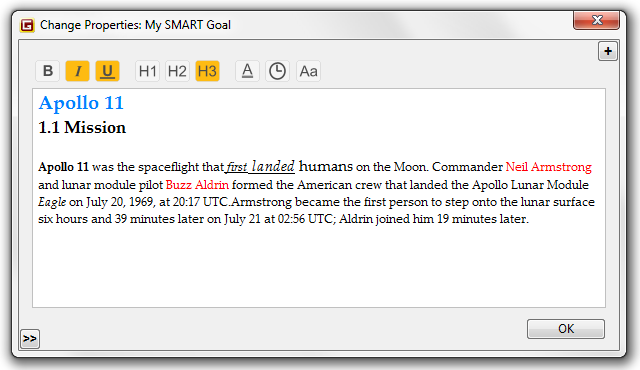
- Enhanced Notes Editor now supports Rich Text features and more.
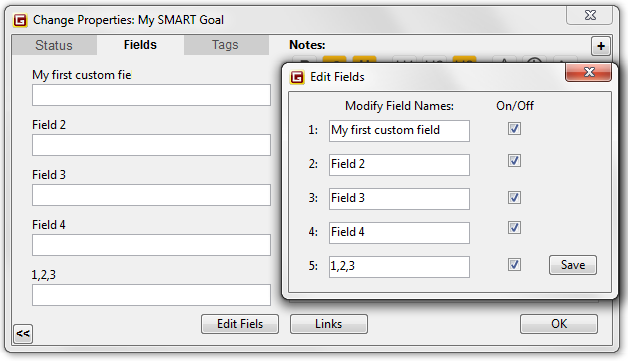
- Custom fields, you can now create your own custom fields for your unique tracking requirements.
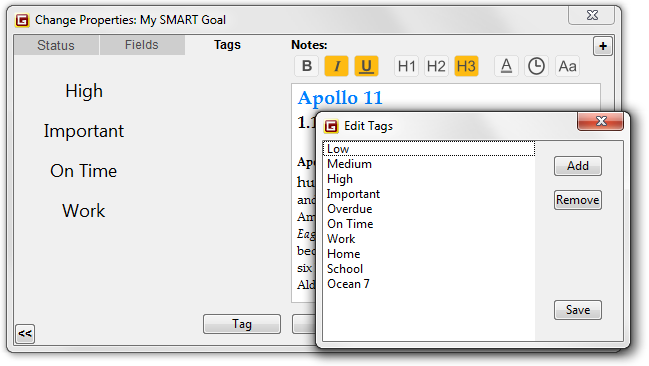
- Custom tags, you can now create your own custom tags to help you organize and prioritize your goals.
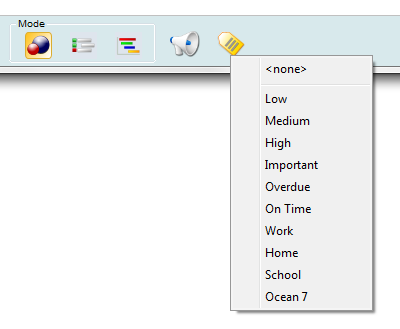
- New Tag Filter (bottom toolbar), can help you create different views for you goals and tasks. It works on map, list and Gantt view modes. You can use the tag filter to display goals and tasks by importance, priority, context, task assignee and much more.
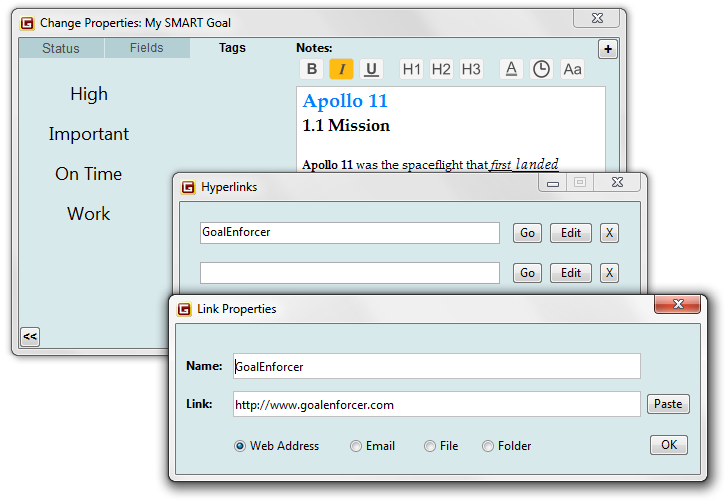
- Hyperlinks, you can now attach hyperlinks directly to goals and tasks. Web sites, local files, local folders
and also emails.
December 24th, 2025 - GoalEnforcer Hyperfocus AI for macOS released
January 29th, 2025 - HOT NEW Product Released: GoalEnforcer Hyperfocus AI
- Artificial Intelligence Goal Generator: the brand new GoalEnforcer Hyperfocus AI now adds powerful AI features.
- You can now set smarter goals with AI:
- Unlock your potential with the power of AI. The Artificial Intelligence Goal Generator helps you create personalized, achievable goals that align with your vision, whether for personal growth, career advancement, or business success.
- Your personal brainstorm buddy that will help you save time & effort: stop guessing and start progressing faster with AI-powered insights today! (learn more)
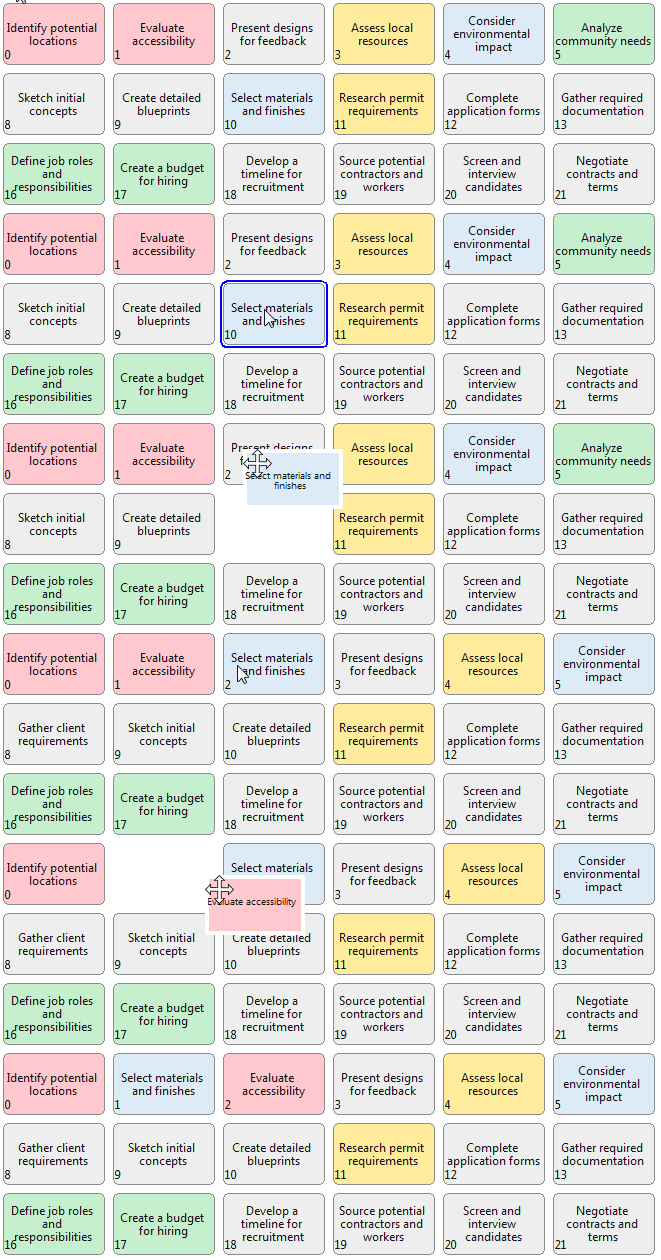
- GE Task Floorplan: visualize ALL your tasks at once on a two-dimensional space with the new "task floorplan"
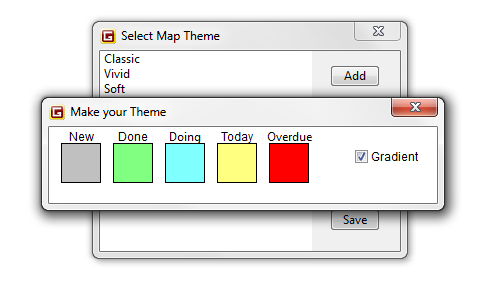
- Map Theme Color Editor: you can now customize the goal map color code according to your preference.